RAZ Vape Charger Type & How to Charge Each Model
01.What Charger Does RAZ Vape Use?
| Device | Battery | Port | Cable | Wall adapter | Full charge (5V/1A) | Vape while charging |
|---|---|---|---|---|---|---|
| RAZ TN9000 | 650 mAh | USB-C on device | Standard USB-C | 5V/1A standard wall brick | not published | Yes — pass-through on |
| RAZ DC25000 / LTX 25K | 800 mAh | USB-C on device | Standard USB-C | 5V/1A standard wall brick | not published | Yes — pass-through on |
| RAZ RYL Classic 35K (Purse Vape) | 820 mAh | USB-C on device | Standard USB-C | 5V/1A standard wall brick | not published | Yes — pass-through on |
| RAZ RX 50K | 800 mAh | USB-C on device | Standard USB-C | 5V/1A standard wall brick | not published | Yes — pass-through on |
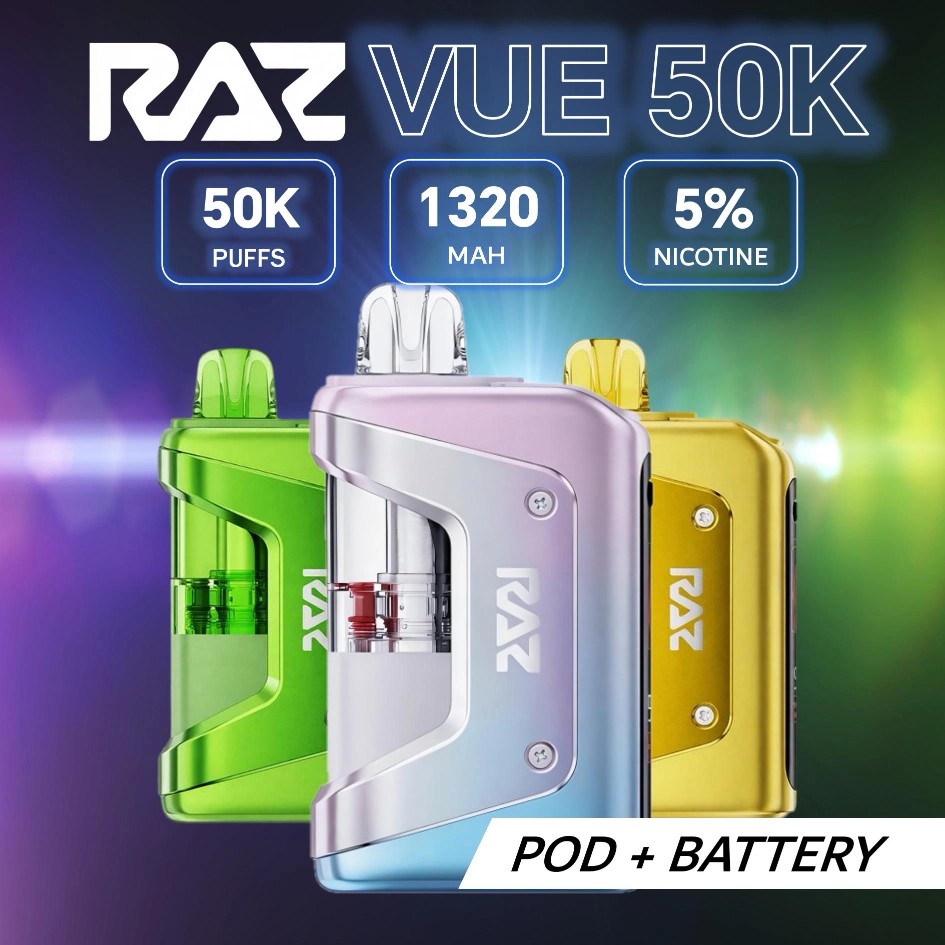
| RAZ VUE 50K Kit (base) | 900 mAh base + 420 mAh in pod (1,320 mAh total) | USB-C on base | Standard USB-C | 5V/1A standard wall brick | not published | Yes — pass-through on |
| RAZ VUE 50K (pod) | none — powered by base | Magnetic to base — no port on pod | None — pod gets power through base | N/A | N/A | Through the base |
| RAZ TN9000 Zero / LTX 25K Zero | Same cell as the 5% model | USB-C | Standard USB-C | 5V/1A | Same as 5% model | Yes |
The cable that ships in the box with every RAZ vape is a standard USB-C. If you lose it, any USB-C cable from your phone or laptop works the same. The wall adapter is not included; any 5V/1A wall brick (the kind that came with most phones in the 2017–2022 era) is the spec.
RAZ Disposable Vape Charger — One Cable Covers Every Model
There is no model-specific RAZ disposable vape charger. RAZ vape chargers are ordinary USB-C cables plus an ordinary 5V/1A brick, which is why the same cord charges a TN9000 on Monday and an RX 50K on Friday. Nothing in the lineup uses micro-USB, a proprietary tip, a barrel plug or a wireless pad, so a replacement never has to come from us — the cable in your drawer is the replacement. The only model that behaves differently is the VUE 50K, and even there the cable goes into the base exactly like every other device.
One recurring mix-up worth naming: searches for how to charge a RAZ Vuse vape come from people typing Vuse for VUE. RAZ VUE 50K and Vuse are not the same company and share no hardware — if the device in your hand says RAZ VUE, the instructions on this page are the right ones; a Vuse device is another brand's product and this guide does not apply to it.
Shop The Rest of the RAZ Lineup








02.RAZ Vape Magnetic Charger — VUE 50K Pod-Swap
The VUE 50K is the only RAZ device with a magnetic connection — but the magnetic part is between the pod and the base, not between the base and the wall. The base charges normally via USB-C. The pod has a magnetic underside that snaps onto the top of the base; power flows from the base's battery to the pod's coil through the magnetic contact pad. There is no separate "pod charger" because the pod has no battery — it is a passive cartridge. So the RAZ VUE 50K charger is nothing more than a USB-C cable into the base, a "RAZ VUE pod charger" does not exist as a product, and the honest answer to how to charge a RAZ vape pod without battery (or how to charge RAZ VUE without battery) is that you can't — the pod carries no cell to charge, so charge the base and reseat the pod.
This is the #1 source of "VUE charger" confusion. Customers search "raz vue charger" expecting a stand-alone pod charger and there is no such thing. The base is the only thing that needs charging. The pod just runs out of e-liquid and gets swapped. Full mechanics on the RAZ VUE.
How to Charge a RAZ Vape Pod Without a Battery in It
You do not charge the pod — you charge the base, and the pod draws from it. A RAZ VUE 50K pod has no battery and no charge port of its own, so there is nothing on the pod to plug into. The sequence: snap the pod onto the charger base until the magnets seat, run a USB-C cable from any 5V/1A wall brick into the port on the base, and let the base fill until the display shows full. The pod is live again the moment the base has charge. If you are holding a pod and no base, no cable will help — the base is the part you are missing, and it comes in the VUE 50K kit.
Two things people get wrong here. Leaving the pod off the charger base while the base charges is fine and changes nothing — the pod takes power on contact, not over time. And a pod that still will not fire on a fully charged base is an empty or dead pod, not a charging fault; swap in a fresh RAZ VUE pods to confirm before assuming the base failed.
How to Charge a RAZ VUE Without a Battery or a Charger
Two different problems get typed the same way. If you have a VUE pod and no battery, the base is the battery — there is no adapter, dock or cable that charges a pod on its own, so you need the base from the VUE 50K kit. If you have the base but no charger, any USB-C cable and any 5V/1A source will do it: a phone brick, a laptop port, a car USB socket or a power bank. RAZ does not use a proprietary charger, so "how to charge RAZ VUE 50K without charger" has a one-line answer: any USB-C cord you already own — nothing has to be bought from us to charge a RAZ VUE 50K. RAZ does not publish a base charge time; the display shows the percentage while it fills.
One thing the charging behaviour does not depend on is nicotine strength — the 0% hardware charges identically, so everything on this page applies unchanged to the RAZ zero nicotine vape line on TN9000 and LTX 25K.
Is There a RAZ Vape Charging Dock or Charger Dock?
No — RAZ has never shipped a charging dock, cradle or charging station for any model. Every RAZ device charges over USB-C directly into the device itself. What people call a "raz vape charging dock" or "raz charger dock" is the VUE 50K base: the pod sits on it magnetically and takes power from it, which looks like a dock but is the device's own battery half, not an accessory. There is no separate dock to buy, and no third-party dock is needed or supported.
03.How to Charge Your RAZ Vape — Step by Step (All Models)
- Find the USB-C port — on the base of every RAZ device. The port is uncovered; there is no plug to remove.
- Plug in a standard USB-C cable — orientation does not matter (USB-C is reversible).
- Connect the other end to a 5V/1A power source — wall adapter, laptop USB port, USB hub, or power bank.
- The screen / LED lights up — devices with HD screens show a "charging" animation; devices with LEDs show a steady red or pulsing color while charging.
- Wait for the full-charge indicator — green LED, full battery bar on screen, or the charging animation stopping. Time varies by model (see table below).
- Unplug — leaving the device plugged in after full charge is fine (overcharge protection is built in), but unplugging is the cleaner habit.
A charged device that still will not fire is usually a draw-activation question rather than a battery one: every current RAZ model is draw-activated with no power button, which is the part that catches buyers coming from a button-fired vape. The full sequence for how to turn on a RAZ vape — and what the bottom slider actually does — is on the user manual page. Battery size across brands, and why a 1,000 mAh Geek Bar charges less often than an 800 mAh RX 50K without lasting longer, is set out in how RAZ and Geek Bar batteries compare.
04.RAZ Vape Charging Time by Model
| Device | Battery | Published charge time | What to expect on 5V/1A |
|---|---|---|---|
| RAZ TN9000 | 650 mAh | Not published by RAZ | Roughly one hour class from empty; unplug when the indicator shows full |
| RAZ DC25000 / LTX 25K | 800 mAh | Not published by RAZ | Roughly one hour class from empty; unplug when the indicator shows full |
| RAZ RYL Classic 35K (Purse Vape) | 820 mAh | Not published by RAZ | Roughly one hour class from empty; unplug when the indicator shows full |
| RAZ RX 50K | 800 mAh | Not published by RAZ | Roughly one hour class from empty; unplug when the indicator shows full |
| RAZ VUE 50K Kit (base) | 900 mAh base + 420 mAh in pod (1,320 mAh total) | Not published by RAZ | Base and pod cell charge together; unplug when the display shows full |
RAZ does not print charge times on the box or the brand site, so the table lists the battery size and what a 5V/1A brick typically does with a cell that size rather than a minute figure. Higher-wattage chargers (15W, 18W, fast chargers) do not charge RAZ devices faster — the device caps the input at its rated 1A. Using a fast charger is not harmful; it just delivers more than the device can accept, and the excess is simply ignored.
Most charge-time questions cluster around two devices: the raz vape 25k (800 mAh) and the raz vape 50k lineup, where the RX 50K carries an 800 mAh cell and the VUE splits its 1,320 mAh between the 900 mAh base and the 420 mAh cell inside each pod.
05.RAZ Vape Not Charging — 6 Fixes
- Try a different USB-C cable. The most common cause is a damaged cable. Swap to a known-good cable and see if charging starts.
- Try a different power source. A wall adapter you have not used in a year may have failed silently. Plug into a different wall brick or a phone charger.
- Wipe the USB-C port. Pocket lint and dust accumulate. Use a toothpick gently or a dry cotton swab to clear the port.
- Wait 30 minutes. Sometimes a near-dead lithium cell needs a "wake-up" period at very low input before the device registers charging. Leave it plugged in for 30 minutes with no indicators — many cases come back.
- VUE only: clean the magnetic contact pad. If the base shows charging but the pod will not register vapor afterward, the pod-to-base contact is the issue. Dry-wipe both the pod underside and the base top.
- Warranty if none of the above works. Email service@raz-vape.com with your order number and a photo of the cable / port / device. Defective-on-charging devices are warranty-covered for 7 days.
06.RAZ Vape Charging Light — What Each Color Means
| Indicator | Meaning |
|---|---|
| Solid red LED | Charging in progress, low charge state |
| Solid green LED | Full charge — unplug |
| Blinking red | Battery very low — charge immediately |
| No light at all | Either fully discharged (wait 30 min plugged in) or charging fault (try different cable) |
| Animated screen (LTX/RX/VUE) | Bar fills as the battery charges; "full" message at 100% |
Specific colors and patterns vary slightly across the device lineup — the on-device manual that ships in the box has the model-specific guide for your device.
07.Best Charger for RAZ Vape — Wall Adapter Picks
The simple answer: any 5V/1A USB-C wall brick. The kind of charger that came with iPhone 12 era, Pixel 3 era, or most mid-2010s Android phones is the right spec. You probably already own three of them. What to avoid: 20W+ fast chargers used with off-brand USB-C cables (the cable may not negotiate the wattage correctly and overheat), and questionable cheap adapters from unknown brands (cell quality on those is unpredictable). Use a wall brick from a brand you trust.
08.Can You Vape While Charging? Pass-Through Mode by Model
Yes on every RAZ device. Pass-through charging is on by default — the device pulls from the USB-C input directly while charging, so you can puff while the cable is plugged in. The cell still charges in the background; the puff just adds a few seconds to the total charge time.
Note: pass-through is fine for occasional use but not the recommended primary charging pattern. The cleanest battery-life habit is to charge in one session (unplug when full) rather than puff-while-plugged repeatedly. The difference is small on lifespan — a few extra cycle equivalents per year — but it is real.
09.RAZ Vape Charger FAQ
Can I swap the VUE pod while it is charging?
Yes — pull the pod off, snap on a different pod, the base keeps charging. Pod swap is independent of the charging circuit.
Does RAZ sell a charging dock or charging station?
No. There is no RAZ charging dock, cradle or charging station for any model — every device takes a USB-C cable directly. The magnetic pad people mistake for a dock is the VUE 50K base, which is half the device rather than an accessory.
How do I charge a RAZ VUE if I do not have the charger?
Any USB-C cable into any 5V/1A source — phone brick, laptop, car socket or power bank. RAZ uses no proprietary charger, so you never have to order one to charge a VUE 50K base.
Is there a RAZ vape pod charger base sold on its own?
No — the charger base is the VUE 50K device itself, not an accessory sold separately. Buying a "pod charger base" means buying a VUE 50K kit, which ships with the base plus a pod. Replacement pods are sold on their own because they are the consumable half; the base is not.
Will a third-party USB-C cable damage my RAZ?
Standard USB-C cables work fine. Cheap unbranded cables from unknown sellers have been documented to fail in ways that stress lithium-ion cells — stick to known-brand cables (Anker, UGREEN, Apple, Samsung, etc.).
Do I need to charge to full before first use?
No — RAZ ships with enough charge for the first puff. Charge when the battery indicator gets low. There is no "break-in" cycle that matters.
Can my RAZ overcharge if I leave it plugged in overnight?
No — the chipset has overcharge protection that stops drawing current at 100%. Leaving it plugged in is not harmful; it is just unnecessary. Unplug when the indicator says full as the cleaner habit.
Does RAZ include a charger in the box?
The current shipment cycle includes a USB-C cable. Wall adapter is not included — you supply your own 5V/1A wall brick. If you need an adapter, add one at checkout — or pair the brick with one of the fresh RAZ vape flavors you have not tried yet.
Battery Acting Up? Run the Reset First
Soft reset takes 30 seconds and fixes most "won't charge" issues before warranty kicks in.